03 Install Quad9 DNSoverHTTPS
1. Install Cloudflared (DoH - DNSoverHTTPS)
Download the latest version:
wget https://github.com/cloudflare/cloudflared/releases/latest/download/cloudflared-linux-arm64
sudo mv cloudflared-linux-arm64 /usr/local/bin/cloudflared
sudo chmod +x /usr/local/bin/cloudflared
Create a user:
sudo useradd -s /usr/sbin/nologin -r -M cloudflared
Configure:
sudo nano /etc/default/cloudflared
Add this:
# Quad9 DoH (privacy-focused with malware/phishing blocking) and with IPv4 and IPv6 support
CLOUDFLARED_OPTS=--port 5053 \
  --upstream https://dns.quad9.net/dns-query \
  --upstream https://dns9.quad9.net/dns-query \
  --upstream https://[2620:fe::fe]/dns-query \
  --upstream https://[2620:fe::9]/dns-query
tip
Quad9 DNS Options:
dns.quad9.net- Recommended: Malware/phishing blocking, DNSSEC validation, no loggingdns10.quad9.net- No blocking, just privacydns11.quad9.net- With EDNS Client Subnet (better CDN performance, slightly less private)
2. Create Service
sudo nano /etc/systemd/system/cloudflared.service
[Unit]
Description=cloudflared DoH proxy for Quad9
After=network.target
Before=pihole-FTL.service

[Service]
Type=simple
User=cloudflared
EnvironmentFile=/etc/default/cloudflared
ExecStart=/usr/local/bin/cloudflared proxy-dns $CLOUDFLARED_OPTS
Restart=on-failure
RestartSec=10

[Install]
WantedBy=multi-user.target
Enable and start the service
sudo systemctl daemon-reload
sudo systemctl enable cloudflared
sudo systemctl start cloudflared
sudo systemctl status cloudflared
cloudflared.service - cloudflared DoH proxy for Quad9
     Loaded: loaded (/etc/systemd/system/cloudflared.service; enabled; preset: enabled)
     Active: active (running) since Sat 2025-12-27 18:44:18 CET; 4s ago
 Invocation: 28b8ea6934754ae9b87bf188f6e266de
   Main PID: 4442 (cloudflared)
      Tasks: 7 (limit: 9578)
        CPU: 69ms
     CGroup: /system.slice/cloudflared.service
             └─4442 /usr/local/bin/cloudflared proxy-dns --port 5053 --upstream https://dns.quad9.net/dns-query --upstr>
[...]
3. Testing
Test Quad9 DNS over HTTPS
- Should return results
dig @127.0.0.1 -p 5053 google.com
; <<>> DiG 9.20.15-1~deb13u1-Debian <<>> @127.0.0.1 -p 5053 google.com
; (1 server found)
;; global options: +cmd
;; Got answer:
;; ->>HEADER<<- opcode: QUERY, status: NOERROR, id: 41769
;; flags: qr rd ra; QUERY: 1, ANSWER: 6, AUTHORITY: 0, ADDITIONAL: 1

;; OPT PSEUDOSECTION:
; EDNS: version: 0, flags:; udp: 1232
; COOKIE: f0342ea7908c3625 (echoed)
;; QUESTION SECTION:
;google.com.                    IN      A

;; ANSWER SECTION:
google.com.             110     IN      A       74.125.29.100
google.com.             110     IN      A       74.125.29.139
google.com.             110     IN      A       74.125.29.113
google.com.             110     IN      A       74.125.29.138
google.com.             110     IN      A       74.125.29.101
google.com.             110     IN      A       74.125.29.102

;; Query time: 64 msec
;; SERVER: 127.0.0.1#5053(127.0.0.1) (UDP)
;; WHEN: Sat Dec 27 18:50:02 CET 2025
;; MSG SIZE  rcvd: 207
- Test malware blocking (should be blocked)
dig @127.0.0.1 -p 5053 malware.testcategory.com
; <<>> DiG 9.20.15-1~deb13u1-Debian <<>> @127.0.0.1 -p 5053 malware.testcategory.com
; (1 server found)
;; global options: +cmd
;; Got answer:
;; ->>HEADER<<- opcode: QUERY, status: NOERROR, id: 55516
;; flags: qr rd ra; QUERY: 1, ANSWER: 2, AUTHORITY: 0, ADDITIONAL: 1

;; OPT PSEUDOSECTION:
; EDNS: version: 0, flags:; udp: 1232
; COOKIE: 2e2d7684d8be0f97 (echoed)
;; QUESTION SECTION:
;malware.testcategory.com.      IN      A

;; ANSWER SECTION:
malware.testcategory.com. 60    IN      A       104.18.4.35
malware.testcategory.com. 60    IN      A       104.18.5.35

;; Query time: 84 msec
;; SERVER: 127.0.0.1#5053(127.0.0.1) (UDP)
;; WHEN: Sat Dec 27 18:51:11 CET 2025
;; MSG SIZE  rcvd: 145
- Check logs
journalctl -u cloudflared -f
Dec 27 18:44:18 pihole5 systemd[1]: Started cloudflared.service - cloudflared DoH proxy for Quad9.
Dec 27 18:44:18 pihole5 cloudflared[4442]: 2025-12-27T17:44:18Z INF Adding DNS upstream url=https://dns.quad9.net/dns-query
Dec 27 18:44:18 pihole5 cloudflared[4442]: 2025-12-27T17:44:18Z INF Adding DNS upstream url=https://dns9.quad9.net/dns-query
Dec 27 18:44:18 pihole5 cloudflared[4442]: 2025-12-27T17:44:18Z INF Starting DNS over HTTPS proxy server address=dns://localhost:5053
Dec 27 18:44:18 pihole5 cloudflared[4442]: 2025-12-27T17:44:18Z INF Starting metrics server on 127.0.0.1:44585/metrics
4. Configure Pi-hole for Quad9
Option 1: Command line
sudo nano /etc/pihole/setupVars.conf
Change to:
PIHOLE_DNS_1=127.0.0.1#5053
PIHOLE_DNS_2=
PIHOLE_DNS_3=
PIHOLE_DNS_4=
Option 2: Web interface
- Go to Settings → DNS
- Uncheck all preset DNS servers
- Add Custom 1 (IPv4):
127.0.0.1#5053 - Save
Restart Pi-hole
- Go to Settings → System
BasictoExpertSystem SettingsRestart DNS resolver
5. Activate IPv6 for Pi-hole
- Go to Settings → DNS
- Check "Listen on all interfaces, permit all origins"
- Enable IPv6 support
Optimize Network Settings (optional)
sudo nano /etc/sysctl.d/99-pihole.conf
Set the following settings:
# Increase network buffers for DNS
net.core.rmem_max=134217728
net.core.wmem_max=134217728
net.ipv4.tcp_rmem=4096 87380 134217728
net.ipv4.tcp_wmem=4096 65536 134217728

# Optimize for low latency DNS
net.core.netdev_max_backlog=5000
net.ipv4.tcp_fastopen=3

# IPv6 optimizations
net.ipv6.conf.all.accept_ra=1
net.ipv6.conf.eth0.accept_ra=1
Apply
sudo sysctl -p /etc/sysctl.d/99-pihole.conf
6. Verification
Firewall Check
sudo ufw status verbose
Status: active
Logging: on (low)
Default: deny (incoming), allow (outgoing), disabled (routed)
New profiles: skip

To                         Action      From
--                         ------      ----
22/tcp                     ALLOW IN    Anywhere
80/tcp                     ALLOW IN    Anywhere
53/tcp                     ALLOW IN    Anywhere
53/udp                     ALLOW IN    Anywhere
443/tcp                    ALLOW IN    Anywhere
22/tcp (v6)                ALLOW IN    Anywhere (v6)
80/tcp (v6)                ALLOW IN    Anywhere (v6)
53/tcp (v6)                ALLOW IN    Anywhere (v6)
53/udp (v6)                ALLOW IN    Anywhere (v6)
443/tcp (v6)               ALLOW IN    Anywhere (v6)
Check for Packet Drop Issues
Check interface errors:
sudo ethtool -S eth0 | grep -i drop
     q0_rx_dropped: 0
     q0_tx_dropped: 0
Check dmesg for issues
dmesg | grep -i eth0
Check for Cloudflared Metrics
Cloudflared has a metrics endpoint, to verify which upstreams it is actually using:
curl http://127.0.0.1:44585/metrics | grep -i upstream
Check DNS Resolution
Should be blocked over Quad9
dig @9.9.9.9 isitblocked.org
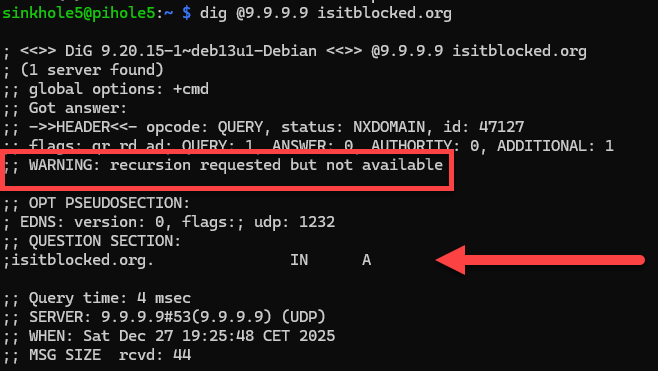
We got no answer, so it is blocked by Quad9
Should not be blocked over Quad9
dig @9.9.9.10 isitblocked.org
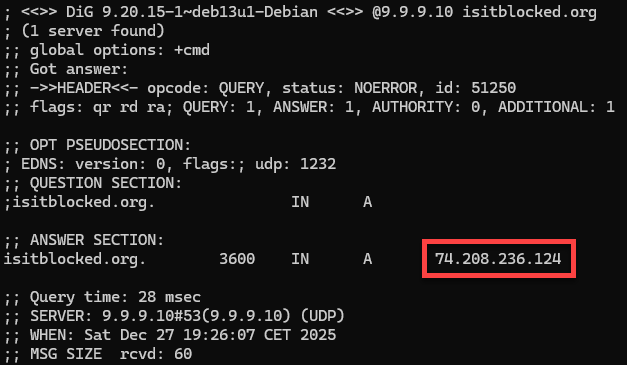
We got an answer, this got not blocked by Quad9
Now our Pi-hole:
dig @127.0.0.1 -p 5053 isitblocked.org
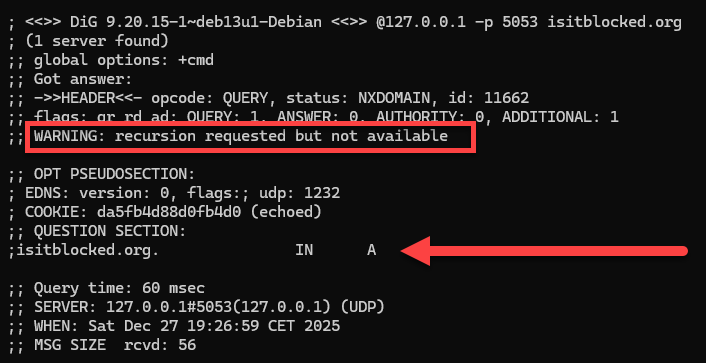
We got no answer, so it is blocked by our DNS!
Check if you make DNSoverHTTPS (DoH)
- Check Active Connections to Quad9
watch -n 0.5 'sudo ss -tunap | grep cloudflared'
udp   UNCONN     0      0                                     127.0.0.1:5053        0.0.0.0:*     users:(("cloudflared",pid=4854,fd=6))
tcp   LISTEN     0      4096                                  127.0.0.1:5053        0.0.0.0:*     users:(("cloudflared",pid=4854,fd=7))
tcp   LISTEN     0      4096                                  127.0.0.1:34133       0.0.0.0:*     users:(("cloudflared",pid=4854,fd=3))
tcp   ESTAB      0      0                                  192.168.0.48:46926  162.159.36.1:443   users:(("cloudflared",pid=4854,fd=10))
tcp   ESTAB      0      0                                  192.168.0.48:46932  162.159.36.1:443   users:(("cloudflared",pid=4854,fd=11))
tcp   ESTAB      0      0      [2a02:21b4:9cda:100:da3a:ddff:fedf:385f]:55210 [2620:fe::fe]:443   users:(("cloudflared",pid=4854,fd=8))
- ✅ Port 443 = HTTPS (encrypted DoH)